You already have months of coding agent history on your machine. ctx lets you search it and blame code to the sessions that wrote it. ctx graph maps relationships across your codebase, and ctx sift cuts noisy tool output before your agent reads it.
Together it is an open, local, fast CLI toolchain for context engineering.
Install and set up ctx
macOS and Linux:
curl -fsSL https://ctx.rs/install | shWindows PowerShell:
irm https://ctx.rs/install.ps1 | iexor prompt your agent:
Please install and set up ctx CLI (see github.com/ctxrs/ctx)Building from source? See the source-build instructions.
Search your agent history
Coding agents have git history, but their own session transcripts and tool call records remain sequestered away in verbose log files. Those log files are a treasure trove of useful data, but they aren't accessible in a legible format for agents.
If you give your agents fast, easy access to search and retrieve these transcripts, your agents can:
- surface decisions, constraints, and assumptions from earlier work
- find investigations, solutions, and failed approaches already explored in previous sessions
- audit previous sessions in detail
- pick up where previous work left off, even across multiple threads
That means less repeated agent work, lower token spend, and better task outcomes because each new session can use the history already on your machine.
ctx also understands how parent sessions, subagents, and forks relate to one another, so agents can recover the whole chain of work no matter how aggressively you orchestrate.
This is different from “agent memory,” which usually compacts what happened into facts or summaries that can become stale. ctx gives agents instant recall of the real record without a lossy memory step.
Your past coding agent sessions already live on your machine, usually in JSONL files or SQLite databases under directories such as ~/.claude and ~/.codex.
ctx setup discovers those sources and reads them without modifying them. It converts each provider’s format into consistent local records for sessions, messages, tool calls, relationships, and repository activity, then stores and indexes those records locally.
ctx does not require hooks or any code running inside the agent process. Automatic indexing is on by default and keeps the index current as those history sources change. Each update is completed before it becomes visible, so commands never read a partially built index.
Every session and event receives a stable ctx ID and retains its complete transcript content and source information. ctx search finds the relevant history, ctx show retrieves the exact event or full transcript, and ctx locate identifies where it came from. Semantic search and Blame use those same records.
# Index all of your existing local agent sessions
ctx setup

# Your agent can search prior work with normal language
ctx search "failed migration"

# Search sessions and events that touched a file
ctx search --file crates/foo/src/lib.rs

# Or search multiple terms
ctx search --term "failed migration" --term rollback --term "cursor rename"

# Results include matching sessions, snippets, and ctx IDs
# evt_01h...  ses_01h...  codex  "migration expected the old cursor name" ...

# Print the matching part of the old transcript
ctx show event <ctx-event-id> --window 3

# Or print a compact transcript of the original session
ctx show session <ctx-session-id>
Search uses BM25 lexical matching by default. Give it likely terms—an error, file, command, or decision—and it ranks sessions containing those terms.
Semantic search
Semantic search helps when related ideas use different wording. ctx computes embeddings locally and searches them directly, without a vector database to run. Enable it with:
ctx semantic enable
ctx semantic status
Lexical search stays available while the local model builds. The built-in model needs no API key; an explicitly configured external semantic executor can send history and query text to its endpoint. See retrieval backends for setup and privacy details. Transcript text is preserved rather than automatically redacted, so review copied output before sharing it outside your machine.
For the full pipeline, see How ctx works. For a quick first run, see Quickstart.
50x more token-efficient than raw transcript search
By structuring agent history into sessions, events, metadata, and indexed fields, then returning ranked cited matches, agents can access meaningful history with far fewer tokens than raw search. Results vary by query and corpus, but raw search is often so token-heavy that it can be effectively the same as not having usable history.

Blame code to the agent that wrote it
git blame tells you which commit last changed a line. ctx blame tells you which agent session produced that commit, with exact citations back to the original transcript and recorded tool calls.
Agents use ctx blame to recover context that no longer exists anywhere near the current session. Starting from a file, line range, commit, or PR, they can find the relevant historical agent sessions and recover the decisions, constraints, failed approaches, and assumptions recorded there.
This helps agents:
- recover constraints and decisions no longer visible in the code
- uncover assumptions embedded in earlier changes
- avoid retrying approaches that already failed
- resume work without relying on lossy compaction summaries
- audit past agent work to improve instructions, tools, and workflows
Every attribution includes citations back to the original transcript and tool calls. If the session is not on your machine (for example, because a teammate’s agent produced the code), ctx says it cannot prove the attribution.
# Your agent is investigating why customized cart items
# are disappearing from your e-commerce app.
$ ctx blame file src/checkout.ts --lines 118:146

# ctx blame finds the agent session that produced those lines:
# Lines 118–146
#   commit    8f3c2a1
#   Produced by
#     session   c0297b8a-2ad7-4f73-a826-8ee9387cd1f4
#     evidence  [1] [2]

# Your agent opens the transcript of the session that produced the offending commit
$ ctx show session c0297b8a-2ad7-4f73-a826-8ee9387cd1f4

# Previous agent — transcript excerpt
"Some responses contain multiple cart lines with the same product_id.
I'm treating those as duplicates and merging them before calculating the total."

# Your agent finds the mistake
"FOUND IT: The previous agent treated matching product_ids as duplicate cart lines.
Customized items can share a product ID, so that merge drops valid items."
ctx blame can also start from a commit or PR:
ctx blame commit <sha>
ctx blame pr https://github.com/your-org/your-repo/pull/42
Like ctx indexing and search capabilities, blame runs locally, so your code and history never leave your machine.
Learn how to use Blame, including supported inputs, evidence limits, and local indexing.
Map your codebase
Graphify started with a great idea and became popular fast. The problem is that its Python/NetworkX architecture does not scale well. It installs about 30 direct dependencies, and the CLI reloads the entire graph into memory for every query. On a large repo, that can make each search slow enough to drag down an agent’s entire task.
ctx graph is a rewrite in Rust. It keeps the graph indexed in SQLite, so searches query the database directly and updates only touch changed files. Static indexing and search run as one native binary with no Python environment, API key, model, or background service.
If you aren’t familiar with Graphify, it’s like a local version of Sourcegraph: it builds a graph of your codebase and docs so an agent can ask who calls something, what depends on it, and what might break if it changes.
You might not need ctx graph or Graphify for a smaller project. Agents are surprisingly good at getting around a codebase using normal read and search tools. On a larger project, ctx graph gives them a much faster way to follow relationships across files instead of spending tokens repeatedly searching the repository.
If you train coding models, try giving ctx graph to the agents in your rollouts.
Try it
From any project:
ctx graph index .
ctx graph stats
ctx graph search authenticate
Replace authenticate with a symbol from your project, then copy its exact ID into an impact query. That shows the symbol, the code that depends on it, and the relationship between them:
$ ctx graph impact 'python:src/auth.py:authenticate@64'
Generation 1 (indexed snapshot)
python:src/auth.py:authenticate@64  function  authenticate  src/auth.py:4
python:src/auth.py:login@136         function  login         src/auth.py:7
python:src/auth.py:login@136 --calls--> python:src/auth.py:authenticate@64
ctx graph saves the graph at .graf/index.db. After changing code, update only what changed:
ctx graph updateUse --json for structured output and an exact node ID when a name is ambiguous. The usage guide covers callers, callees, paths, filters, reports, exports, multiple projects, and supported inputs.
Why ctx graph is better than Graphify
ctx graph is Graphify, but rebuilt properly in Rust: 1000x faster search, 89x faster updates, and one native binary.
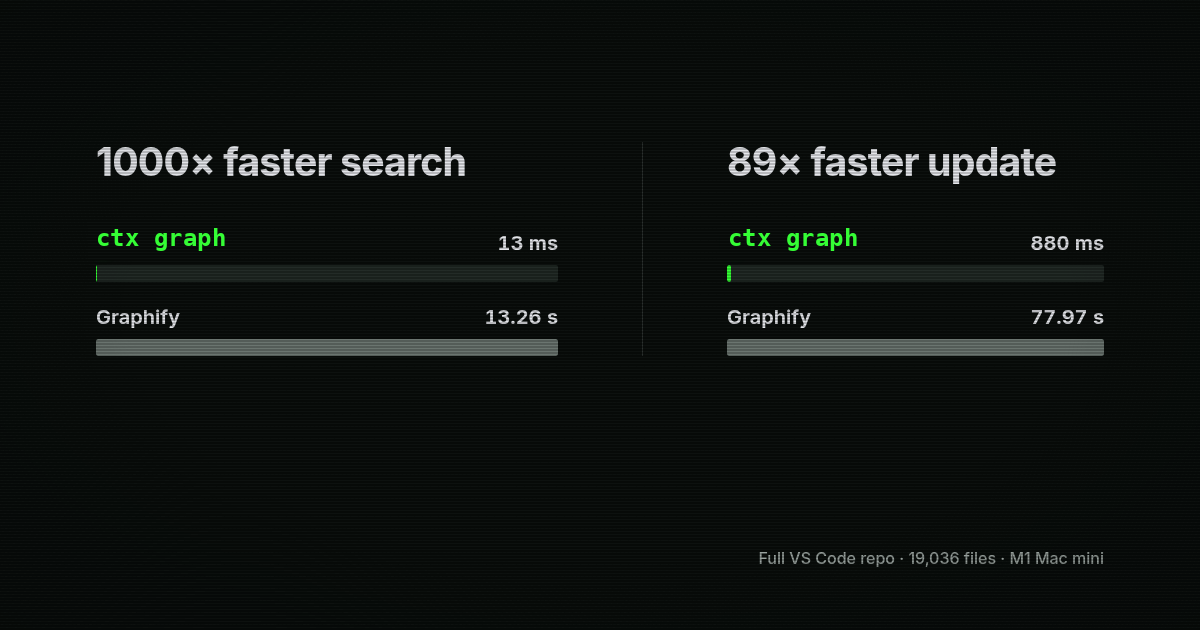
It is also stricter about correctness. Updates become visible as one complete generation, so a failed extraction cannot publish half a graph. When two symbols could be the answer, ctx graph returns the ambiguity and the source evidence instead of guessing.
ctx graph is an independent implementation, not a fork or a drop-in replacement for Graphify's Python API. The chart uses the complete 19,036-file VS Code repository on an M1 Mac mini. Cold indexing was effectively tied, while ctx graph produced 2.4x as many nodes and 1.7x as many edges with 31% less peak memory. See the benchmark method, results, and tradeoffs.
Migrate from Graphify
Existing .graf/index.db databases work with ctx graph; no conversion is required.
Use ctx graph --help for the full command set.
Use ctx graph with an agent
Use ctx integrations install skill and ctx integrations install mcp --agent codex.
Optional project graph tool hooks use ctx graph install --platform gemini --project PATH (or claude or codebuddy); remove them with ctx graph uninstall and the same selections.
Cut noisy tool output
ctx sift cuts noisy tool output before it reaches your coding agent. It leaves the original commands untouched and spends fewer tokens on repeated paths, logs, and formatting while keeping useful details visible.
Ordinary compaction runs locally. If you enable original retention, ctx recall can recover the complete captured output. The optional Jev selector is off by default and sends eligible passages to an external service only when you enable it.
Try it
Run commands through Sift:
ctx sift -- git status
ctx sift -- cargo test
To have a supported agent use Sift automatically, run ctx integrations install sift --agent claude-code. You can also sift a saved result:
ctx sift build.logShort output, live progress, and binary data pass through. When compaction doesn't save tokens, the original output wins.
Why Sift instead of RTK
ctx favors broad, conservative compaction over a large collection of command-specific summaries. That gives it consistent behavior on arbitrary tool output and makes generic compaction reversible. It also has automatic agent setup, local savings reports, optional original-output recovery, and a one-command migration for recognized RTK integrations.
In the v0.4.0 release benchmark, ctx was faster than RTK 0.49 on all ten of our sample workloads and stayed within 1.35 ms of running the command directly. Across workloads collected from our own real usage, ctx reduced tool call output by 43%.
See how compaction and agent hooks work for the available views, recovery limits, and setup options.
Why ctx search is so fast
ctx is written in Rust, but that's not the main reason history search is fast. Instead of ingesting your history into a local relational database like SQLite, ctx scans it with parallel workers and writes searchable records directly to Tantivy. That removes an entire database ingest step while still supporting structured filtering and complete record retrieval.
Tantivy builds the index in parallel. It creates a compact map from each term to the records containing it and searches memory-mapped segments without loading your entire history into memory. The same index stores the complete record for every result, so ctx search, ctx show, and ctx locate can read it without a second database or reopening and reparsing the original agent logs.
In our benchmark, this was 16x faster than ctx's previous optimized SQLite implementation.

Supported agent histories
ctx supports Claude Code, Codex, Cursor, Pi, Gemini CLI, and many more. See the current provider list.
Explore the docs
| Page | What it covers |
|---|---|
| Install | Install ctx, initialize local storage, and index discovered local history. |
| Quickstart | Search local history, inspect an event, open the session, and use JSON output. |
| Blame | Trace committed code to agent sessions and inspect cited evidence. |
| Install the ctx skill | Install the agent-history search skill with the open skills installer. |
| Package managers and unmanaged installs | Install from GitHub Releases, mise, Homebrew, or source builds. |
| Agent plugin installs | Install the ctx skill through Codex, Claude Code, Cursor, or a raw skill folder. |
| SDKs | Use ctx agent history search from TypeScript, Python, Rust, Go, JVM, Swift, or .NET code. |
| Custom history plugins | Build an advanced local adapter for agent formats ctx does not support natively. |
| Cursor | Import Cursor agent transcripts and ask Cursor to cite retrieved local history before editing. |
| How it works | Understand discovery, import, local search storage, search refresh, and cited retrieval. |
| Supported agents | See which agent histories ctx can discover, import, and search today. |
| CLI reference | Review setup, status, sources, import, show, locate, search, MCP, and doctor. |